Skip to content
VercelLogotypeVercelLogotype
LoginSign Up

Vectr: Natural Language Image Search

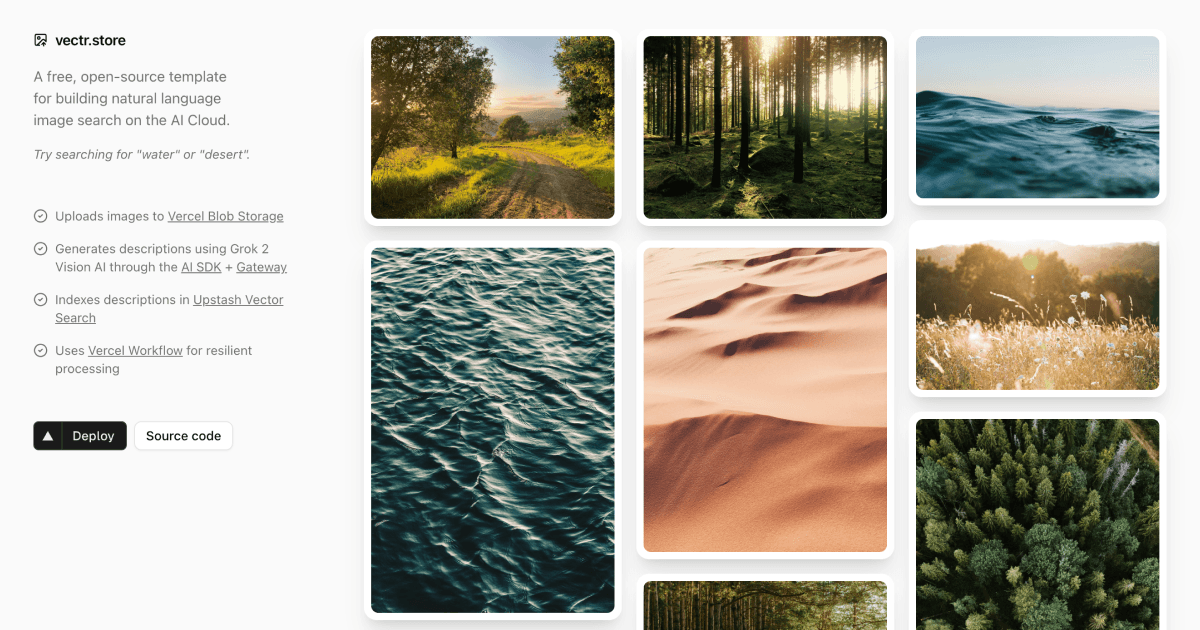
A free, open-source template for building natural language image search on the AI Cloud.

DeployView Demo
A screenshot of vectr.store

Vectr

Vectr is an AI-powered image search application template that automatically generates descriptions for uploaded images and indexes them for semantic search.

✨ Features

  • šŸ“¤ Drag-and-drop image uploads with Vercel Blob Storage
  • šŸ¤– AI-powered image descriptions using Grok 2 Vision
  • šŸ” Semantic search with Upstash Vector Search (stores metadata too!)
  • šŸ”„ Resilient processing with Vercel Workflow automatic retries
  • šŸŽØ Beautiful UI built with shadcn/ui and Tailwind CSS
  • šŸ’° Incredibly cheap - No database needed!

šŸš€ How It Works

When you upload an image, Vectr automatically:

  1. šŸ’¾ Stores the image in Vercel Blob Storage
  2. 🧠 Generates a detailed description using Grok 2 Vision AI
  3. šŸ”Ž Indexes the description AND metadata in Upstash for semantic search
Loading diagram...

šŸ—ļø Architecture

Workflow Steps

Each step in the image processing workflow is isolated and runs on a separate serverless function with automatic retries:

Step 1: Upload Image (upload-image.ts)

  • šŸ’¾ Uploads to Vercel Blob Storage
  • ā±ļø Handles rate limiting with 1-minute retry delays
  • šŸ”„ Maximum 3 retry attempts
  • āŒ Fatal error on quota exceeded or invalid files

Step 2: Generate Description (generate-description.ts)

  • šŸ¤– Uses Grok 2 Vision AI to analyze the image
  • ā±ļø Handles rate limiting with 5-minute retry delays
  • šŸ”„ Maximum 5 retry attempts
  • āŒ Fatal error on invalid/unsupported images

Step 3: Index Image (index-image.ts)

  • šŸ”Ž Indexes description AND blob metadata in Upstash
  • šŸ’¾ Stores all image data (url, size, contentType, etc.) as metadata
  • ā±ļø Handles rate limiting with 1-minute retry delays
  • šŸ”„ Maximum 5 retry attempts
  • āŒ Fatal error on invalid data

Error Handling

Vectr uses sophisticated error handling to ensure reliable processing:

  • šŸ”„ RetryableError: Temporary failures (rate limits, network issues, timeouts)
  • āŒ FatalError: Permanent failures (invalid data, constraint violations)
  • šŸ“Š Context-aware retries: Each step tracks attempt count and timestamps
  • šŸŽÆ Smart HTTP responses: 400 for fatal errors, 500 for retryable errors

šŸ› ļø Tech Stack

  • ⚔ Framework: Next.js 15 with App Router and React 19
  • šŸ”„ Workflow: Vercel Workflow (alpha)
  • šŸ¤– AI: Grok 2 Vision via Vercel AI SDK
  • šŸ” Search & Storage: Upstash Vector Search (stores metadata too!)
  • šŸ’¾ Blob Storage: Vercel Blob Storage
  • šŸŽØ UI: shadcn/ui + Tailwind CSS 4
  • šŸ”’ Type Safety: TypeScript + Zod

šŸš€ Deploy to Vercel

The easiest way to deploy Vectr is using the Vercel Marketplace:

During deployment, you'll be prompted to set up:

  1. šŸ” Upstash Vector Search - Semantic search + metadata storage
  2. šŸ’¾ Vercel Blob Storage - Image storage

Both services have generous free tiers and will be automatically configured. No database needed!

šŸ’» Local Development

Prerequisites

  • 🟢 Node.js 18+
  • šŸ“¦ pnpm (recommended)

Setup

  1. Clone the repository:
git clone https://github.com/your-username/vectr.git
cd vectr
  1. Install dependencies:
pnpm install
  1. Set up environment variables:

Create a .env.local file with:

# Upstash Search
UPSTASH_SEARCH_URL="https://..."
UPSTASH_SEARCH_TOKEN="..."
# Vercel Blob
BLOB_READ_WRITE_TOKEN="..."
# AI Gateway Key (only needed locally)
AI_GATEWAY_API_KEY="..."
  1. Run the development server:
pnpm dev

Open http://localhost:3000 to see your app.

šŸ“œ Scripts

  • šŸš€ pnpm dev - Start development server with Turbopack
  • šŸ—ļø pnpm build - Build for production
  • āœ… pnpm check - Run linting checks
  • ✨ pnpm format - Format code with Biome

šŸ“ Project Structure

vectr/
ā”œā”€ā”€ app/
│ ā”œā”€ā”€ actions/
│ │ └── search.ts # Server action for search
│ ā”œā”€ā”€ api/
│ │ └── upload/
│ │ ā”œā”€ā”€ route.ts # Workflow route handler
│ │ ā”œā”€ā”€ upload-image.ts # Step 1: Upload to Blob
│ │ ā”œā”€ā”€ generate-description.ts # Step 2: AI description
│ │ └── index-image.ts # Step 3: Index with metadata
│ ā”œā”€ā”€ layout.tsx
│ └── page.tsx
ā”œā”€ā”€ components/
│ ā”œā”€ā”€ header.tsx
│ ā”œā”€ā”€ results.tsx
│ ā”œā”€ā”€ upload-button.tsx
│ └── uploaded-images-provider.tsx
ā”œā”€ā”€ lib/
│ └── utils.ts
└── package.json

šŸ” Environment Variables

VariableDescriptionRequired
UPSTASH_SEARCH_URLUpstash Vector Search endpointYes
UPSTASH_SEARCH_TOKENUpstash authentication tokenYes
BLOB_READ_WRITE_TOKENVercel Blob Storage tokenYes
XAI_API_KEYxAI API key for Grok VisionYes

šŸ“Š Observability

Vectr includes comprehensive logging for monitoring and debugging:

  • šŸ”„ [WORKFLOW] - Workflow-level events and timing
  • šŸ”§ [stepId] - Step-level events with unique identifiers
  • 🌐 [API] - HTTP request/response logging

All logs include timestamps, attempt counts, and duration metrics.

šŸ¤ Contributing

Contributions are welcome! Please feel free to submit a Pull Request. Our Contributing Guide [blocked] has more information on how to get started.

šŸ“„ License

MIT

GitHub
Ownervercel-labs
Repositoryvectr
Use Cases
AI
Stack
Next.js
Tailwind
Database
Vercel Blob
Upstash

Related Templates

Next.js Boilerplate

Get started with Next.js and React in seconds.
Next.js Boilerplate thumbnail

Image Gallery Starter

An image gallery built on Next.js and Vercel Blob.
Image Gallery Starter thumbnail

Chatbot

A full-featured, hackable Next.js AI chatbot built by Vercel
Chatbot thumbnail

Agent Stack

  • AI SDK
  • AI Gateway
  • Sandbox
  • Workflows
  • EveNew
  • ConnectNew

Core Platform

  • CI/CD
  • Content Delivery
  • Fluid Compute
  • Observability

Security

  • Platform Security
  • WAF
  • Bot Management
  • Bot ID

Tools

  • Vercel DropNew
  • Vercel Agent
  • Vercel PluginNew
  • Next.js
  • Domains
  • v0

Frameworks

  • Nuxt
  • SvelteKit
  • Nitro
  • Turborepo
  • Tanstack Start
  • FastAPI
  • xmcp
  • All frameworks

SDKs

  • Vercel SDK
  • Workflow SDKNew
  • Flags SDK
  • Chat SDKNew
  • Queues SDKNew
  • Streamdown

Build

  • AI Apps
  • Web Apps
  • Marketing Sites
  • Platforms
  • Commerce
  • Platform Engineers
  • Design Engineers

Learn

  • Docs
  • Blog
  • Changelog
  • Knowledge Base
  • Academy
  • Articles
  • Community

Explore

  • Customers
  • Marketplace
  • Templates
  • Partner Finder
  • Vercel + AWS

Company

  • About
  • Careers
  • Press
  • Events
  • Startups
  • Shipped on Vercel
  • Open Source Program
  • Enterprise
  • Pricing
  • Help

Legal & Trust

  • Privacy Policy
  • Terms of Service
  • Cookie Policy
  • DPA
  • Acceptable Use Policy
  • Legal (all documents)
  • Trust Center
  • Status

Social

  • GitHub
  • X
  • LinkedIn
  • YouTube
  • Instagram
  • VercelVercel
Agent Stack
  • AI SDK
  • AI Gateway
  • Sandbox
  • Workflows
  • Eve
Core Platform
  • Security
  • Content Delivery
  • Fluid Compute
  • Observability
  • CI/CD
Tools
  • Next.js
  • Vercel Agent
  • Vercel Plugin
  • Domains
  • v0
Learn
  • Docs
  • About
  • Blog
  • Changelog
  • Knowledge Base
Build
  • AI Apps
  • Web Apps
  • Marketing Sites
  • Platforms
  • Commerce
Explore
  • Customers
  • Marketplace
  • Partner Finder
  • AWS
  • Community
EnterprisePricing
Contact
Log InSign Up
Dashboard

Products

Agent Stack

  • AI SDK
  • AI Gateway
  • Sandbox
  • Workflows
  • Eve

Core Platform

  • Security
  • Content Delivery
  • Fluid Compute
  • Observability
  • CI/CD

Tools

  • Next.js
  • Vercel Agent
  • Vercel Plugin
  • Domains
  • v0
Resources

Learn

  • Docs
  • About
  • Blog
  • Changelog
  • Knowledge Base

Build

  • AI Apps
  • Web Apps
  • Marketing Sites
  • Platforms
  • Commerce

Explore

  • Customers
  • Marketplace
  • Partner Finder
  • AWS
  • Community
Enterprise
Pricing
Sign UpLog In
Contact
DeployView Demo

Loading status…

Select a display theme: